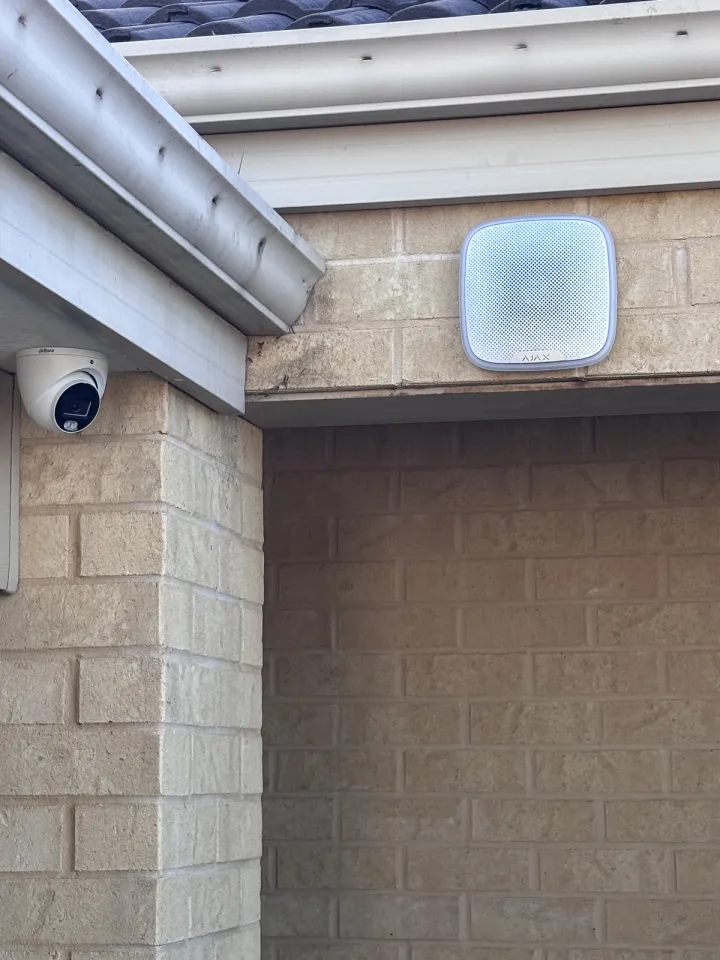
On most jobs I fit an Ajax alarm and Dahua cameras. Two brands in one system looks odd until you look at what each one is for and what it costs.
Ajax for the alarm
Ajax is the alarm system I install. It runs from the Ajax app and tells you the moment something happens, and I choose the line, Superior or Baseline, to suit the property: how I choose. The Ajax alarm systems page has the packages and device prices.
Dahua for the cameras
I choose cameras by the datasheet numbers and the price, not the logo, and I fit the brand you prefer. Dahua is the one I recommend most, because it gives very good value for the money: the sensor, the lens and how well it sees at night, at a fair price.
I choose by the datasheet numbers, not the logo. Every camera on the Dahua cameras and recorders page links Dahua's own datasheet, so you can check a number yourself, and every one of them can give you colour after dark.
What about Ajax cameras?
Ajax cameras are good. They cost more, and most clients would rather put that money into more coverage. If you want the cameras in the same app as the alarm and the budget allows, Ajax cameras are an option. The Ajax cameras page covers them, including an Ajax recorder that works with cameras you already have.
How it works on your phone
The alarm is in the Ajax app and the cameras are in Dahua's DMSS app. Both go on your phone and I set both up before I leave. Relatives' phones can be added too, which matters when someone lives alone and has a panic button.
Both apps reach your phone over the internet. What the alarm and the cameras do when the power or internet goes out is covered in power and internet outages.
Two real examples
- Armadale: an Ajax Hub 2 Plus alarm with a panic button, plus four Dahua IPC-HDW3667EM-S-IL-ANZ cameras on a 4-channel NVR. Read the write-up.
- Beeliar: an Ajax Hub 2 Plus alarm including the garage door, plus six Dahua cameras on an 8-channel NVR. Read the write-up.
Where to start
Build the alarm in the Ajax configurator and the cameras in the CCTV system builder, and send both to me to quote. Or call, and tell me what you want to protect.
For prices, see what an alarm or CCTV system costs in Perth, and for how the job runs, from quote to install day.
Need Help With This?
Dextel Electrical & Security Services serves Perth metro. Free quotes, no obligation.
Get a Free Quote →