Plenty of Perth homes still have a wired alarm panel from the late 90s or 2000s sitting in a hallway cupboard (a Ness, a Bosch, a Hills), with a keypad that beeps, a code nobody remembers changing, and no way to check the system from your phone.
The assumption is usually that upgrading means starting over: new panel, new sensors, new cabling, walls opened up. That is one option, and sometimes it is the right one.
But the cabling and the detectors in an old system are frequently the parts still doing their job perfectly well. It is the panel that is obsolete: no app, no mobile backup, no useful notifications. Replacing just the panel and bringing the existing wired devices across is a real option, and on a lot of houses it is the better one.
This is how it actually works.
Repair, retrofit or replace an old alarm?
When an old alarm starts playing up, there are three ways to go:
- Repair the old panel. There is one repair worth doing, and it is the backup battery. A panel that beeps, or drops out whenever the power blinks, usually has a flat sealed battery sitting behind the door. Swapping one is a small job, charged for the time and the battery rather than at a fixed price, the same as any other service call. Past that, the old panels are past it: board-level faults on a system that age are not worth chasing, and a working repair still leaves you with no app and no alerts on your phone.
- Retrofit. Keep the cabling and the detectors that still work, and replace the panel with Ajax. That is what most of this page is about.
- Replace. A new wireless Ajax system, when the cabling or the detectors are not worth saving. The section further down, on when a retrofit is not the right answer, covers how to tell.
Can an electrician service a burglar alarm? Not on an electrical licence alone. In WA, anyone paid to install, maintain or repair security alarms and CCTV needs a security installer licence issued by WA Police (ABLIS: Security Installer Licence, WA). I hold both: electrical contractor EC12377 and security agent SA54405. For what each option costs, see what an alarm costs in Perth.
What does the work: the MultiTransmitter
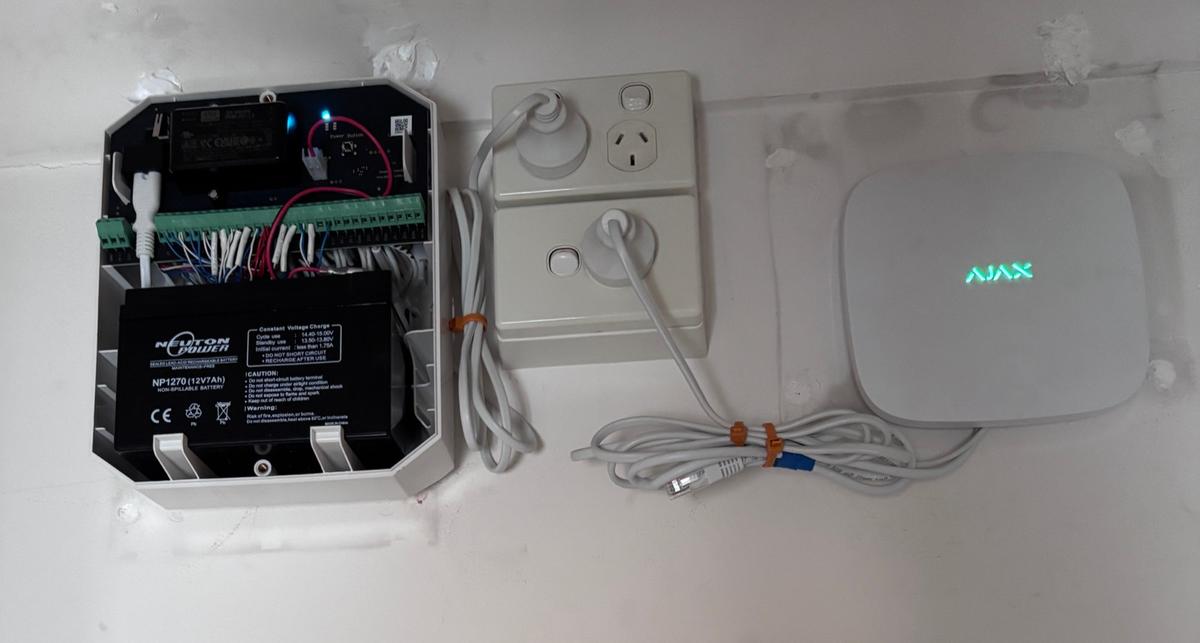
Ajax detectors are wireless, but Ajax has a module built for this job: the MultiTransmitter. It is an integration module with 18 wired zone inputs that reports back to an Ajax hub over the same encrypted Jeweller radio link the wireless detectors use. You can read more about the system itself on our Ajax wireless alarms page. For how I choose between the two Ajax lines, see Ajax Superior or Baseline.
Your existing wired detectors terminate into the MultiTransmitter instead of into the old panel. From the hub's point of view, and from yours in the app, they behave like any other Ajax device. Each wired zone appears as its own named device with its own state.
So the old cabling stays in the walls, the old detectors stay on the walls, and the obsolete panel comes out.
What carries over, and what does not
Usually carries over:
- PIR motion detectors: if they are functioning, they are generally fine. Old PIRs are simple devices.
- Reed switches on doors and windows, because magnetic contacts do not really age.
- Vibration and shock sensors on glass doors and windows.
- The cabling itself: normally multicore alarm cable with plenty of spare cores.
Does not carry over:
- The keypad. Old keypads are proprietary to their panel. Arming and disarming moves to the app, an Ajax keypad, or a key fob.
- The siren, usually. Old external sirens can sometimes be retained, but the internal wiring and tamper arrangements often make a new one the cleaner choice.
- The panel and its dialler. If it is still on a phone line, that is frequently the actual reason the system stopped being useful.
The judgement call: detectors from the early 2000s are typically still serviceable. Anything visibly degraded, water-affected, or intermittent should be replaced rather than carried across. You do not want to build a new system on a sensor you already do not trust.
The details that decide whether it works
This is where retrofits succeed or turn into a fortnight of nuisance alerts.
End-of-line resistors
Wired zones use an end-of-line resistor so the panel can distinguish a triggered detector from a cut cable. Old installs vary enormously in how this was done: a single resistor, two resistors, or occasionally none at all where someone took a shortcut. The MultiTransmitter supports normally open, normally closed, and one, two or three-resistor configurations, so most of what is already in the walls can be accommodated.
Before anything is connected, each zone needs to be traced and its resistance measured, not assumed from a faded label. The module has a Measure sensors resistance function for exactly this, and it is worth running on every zone rather than trusting the documentation.
Tampers were often never connected
On a lot of older installs, the tamper contacts in the detector housings were simply never wired back to the panel. That was a common shortcut, and it means a zone that looks like it has tamper protection may not.
Worth knowing before you rely on it.
Pulse time: the one that catches people out
Each MultiTransmitter zone has a pulse time setting: how long a contact must stay in the triggered state before the system counts it as a real event. The available settings are 20 ms, 100 ms (the default) and 1 second, and Ajax describes the setting as a false alarm filter.
The short settings are intended for fast electronic outputs. Mechanical detectors (vibration sensors, reed switches, anything with physical contacts) bounce as they make and break. On a short pulse time, that contact bounce reads as a genuine trigger, and you get false activations that look random and are miserable to diagnose.
The manual does not name a value for mechanical detectors. In our experience, and consistent with what Ajax support advised us, 1 second is the setting that stops it on mechanical vibration detectors. It is the single most common cause of nuisance triggers we see on a retrofit.
Detector sensitivity
Many vibration sensors have their own physical sensitivity selector, often a High/Medium/Low jumper or switch inside the housing. If a zone still misbehaves after the pulse time is correct, that selector is the next thing to check, and it means going back to each detector rather than fixing it from the app.
What the detector can and cannot know
One worth understanding before you commit to a design: a vibration-only sensor detects impact and movement. It has no idea whether a door or window is open or closed. That is a reed switch's job, and the two are separate devices even when they are mounted together.
That matters if you want to arm the system in Home mode while leaving a door or window ajar for airflow. A vibration sensor on an open door is not wrong, it just cannot tell you the door is open. If you need that, the opening needs a reed switch as well, and some sensors are supplied as combined vibration-plus-reed units for this reason.
Sorting this out at design time is much cheaper than discovering it after the system is live.
What you get that the old panel could not do
- The app. Arm, disarm, and see every zone's state from anywhere. Individual devices are named, so you know it was the laundry window, not just “Zone 7”.
- Cellular and Wi-Fi communication paths, not a phone line that may not exist anymore.
- Push notifications with event history, so you can see what happened and when.
- Jamming detection. Worth being precise about this: the Jeweller link is encrypted and the hub detects and reports interference over its cellular path. That is detection and alerting, not a guarantee of immunity. Anyone telling you a wireless system simply cannot be jammed is overselling.
- Room to expand wirelessly. Once the hub is in, adding detectors where there is no cable is trivial.
When a retrofit is not the right answer
Not every old system is worth saving:
- Cabling that is damaged, rodent-chewed, or has been repeatedly modified by different installers over the years.
- Very few zones. If there are three, the labour to trace and integrate them can exceed the cost of fitting wireless detectors.
- Detectors that are already unreliable.
- A layout that never covered the house properly to begin with. Carrying across a bad design just makes it a bad design with an app.
A retrofit is worth doing when the wiring is sound and the coverage is good. It is not worth doing to rescue a system that was mediocre when it was new. We will tell you which one you have got.
What the job involves
- Assess the existing system: trace every zone, measure resistances, test each detector, identify which are worth keeping.
- Decommission and remove the old panel.
- Install the Ajax hub and the MultiTransmitter.
- Terminate the retained zones into the MultiTransmitter and configure each one: device type, pulse time, resistor configuration.
- Run the resistance calibration and walk-test every zone.
- Set up the app, users, arming modes, and notifications.
- Live-test over a normal week and adjust anything that proves twitchy.
Step seven is the one that gets skipped and should not be. Some detectors only reveal their quirks under real household conditions: a door habitually left ajar, afternoon sun on a window, a washing machine on spin cycle.
Three of these, recently
These summaries are published with identifying details removed: we do not publish addresses or anything that identifies the property. Each job was scoped around the existing installation and the customer’s actual requirements.
North Perth: replacing an ageing Ness panel
The old Ness panel in this home had died, and a new wired Ness panel was too expensive. The house had dual vibration-reed sensors and PIRs, so the system was retrofitted around an Ajax Hub 2 Plus and Ajax MultiTransmitter.
- Kept every existing sensor that could be reused, through the MultiTransmitter
- Added two Ajax keypads, two MotionProtect detectors, two DoorProtect sensors, a StreetSiren and a HomeSiren
- Moved the property to app-based Ajax control
Read the full North Perth write-up.
Armadale: a new system, not a retrofit
Not every job reuses old wiring. Armadale was a new installation: an Ajax Hub 2 Plus alarm with a panic button for an elderly client, plus a four-camera Dahua CCTV system. Read the Armadale write-up.
Bibra Lake: commercial Ajax Superior retrofit
At an automotive workshop in Cockburn Central, a Ness panel and a set of coax Swann cameras were replaced with an Ajax Superior hub and eight Dahua cameras, with the six existing PIR detectors carried across on a MultiTransmitter: read that write-up.
At a Bibra Lake commercial premises, a Ness panel around 15 years old was replaced with an Ajax Superior Hub and Ajax Superior MultiTransmitter. The existing sensors and wiring were still sound, so they stayed, with new Superior motion detectors, door switches, sirens and a keypad added. The same job included a seven-camera Dahua CCTV system. Read the full Bibra Lake write-up.
Getting an assessment
Depending on your circumstances, some of the cost of a security upgrade may be claimable. We have covered what is available in our guide to Perth CCTV and security rebates.
If you have got an old wired panel and want to know whether it is worth retrofitting or replacing outright, we will assess it and tell you plainly either way, including when the existing system is not worth carrying across. Quotes are free and in writing. Our licence numbers are EC12377 (electrical contractor) and SA54405 (security agent), and you can get in touch here.
Need Help With This?
Dextel Electrical & Security Services serves Perth metro. Free quotes, no obligation.
Get a Free Quote →